 Your Money
Should You Link Your Bank Account to a Budgeting App?
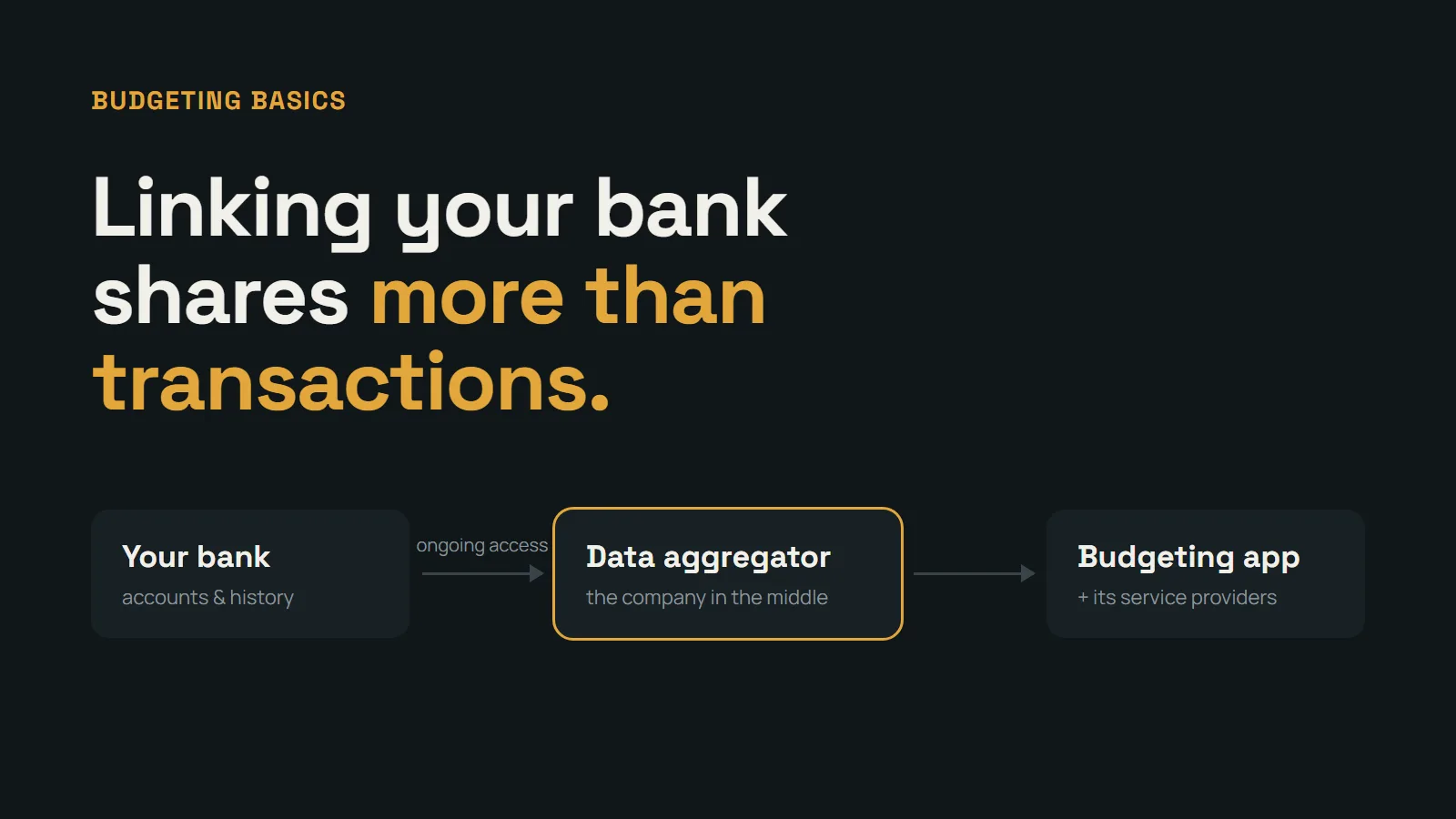
Most budgeting apps ask you to link your bank account within the first minute of setup. It’s presented as the obvious first step — connect your accounts, and your spending appears automatically. For a lot of people that convenience is real. But linking is also a decision about who gets ongoing access to your financial life, and the setup screen rarely spells out what that access includes.
Neither choice is wrong. Linked tracking and manual tracking each have real strengths. The point is to make the choice knowingly instead of tapping through it.
What actually happens when you link your bank
Most budgeting apps don’t connect to your bank directly. They work through a third-party data aggregator — a company that sits between your bank and the app and passes your data from one to the other.
Depending on your bank, linking works one of two ways: you either sign in on your bank’s own page and approve access, or you type your bank username and password into a screen run by the aggregator. Either way, the result is the same — an ongoing connection, so new transactions keep flowing to the app until someone ends it.
What you’re sharing is usually more than transactions
Depending on the app and the aggregator, that connection can include:
- Your transaction history, often going back months or years, not only new purchases from today forward
- Balances for every account at that bank you choose to connect
- In some cases, your account and routing numbers
- Identity details your bank has on file, such as your name, address, and email
It’s also shared with more than one company. The app, the aggregator, and the service providers each of them uses all handle the data under their own privacy policies, their own retention periods, and their own security practices.
Most tracking connections are read-only, meaning the app can see your money but can’t move it. That’s worth knowing, but it doesn’t change the main point: the data itself is the sensitive part.
The connection tends to outlive the app
Deleting a budgeting app from your phone doesn’t necessarily end its access to your bank data. The connection usually stays active until it’s revoked — in the app’s settings, through your bank’s list of connected apps, or sometimes through the aggregator’s own portal.
Plenty of people have active connections from apps they stopped using years ago. If you’ve ever linked an account and want to check, look in your bank’s security or privacy settings. Most banks list the third-party apps that currently have access, with an option to remove them.
What linking does well
To be fair to automatic tracking, it has real advantages:
- Every card payment gets captured, including the small ones that are easy to forget
- It takes almost no ongoing effort once it’s set up
- It suits people juggling many accounts and cards, or people who know they’d never log purchases by hand
If you’ve tried budgeting before and the thing that broke it was forgetting to record purchases, linking is a legitimate answer to that problem.
What manual tracking does better
Manual entry trades a few seconds per purchase for a different set of benefits:
- You decide what gets recorded. Nothing ends up in the app that you didn’t put there yourself
- Entering an amount yourself makes you notice it in a way that an automatic import doesn’t. Many people find this is where the actual change in spending comes from
- There are no duplicate imports, broken connections, or cryptic merchant names to clean up — linked apps still need regular review to stay accurate
- It works the same no matter which bank or credit union you use, and it handles cash just as easily as cards
The honest trade-off is that manual tracking only works if you actually log. The good news is that it doesn’t need to be detailed — an amount and a rough category is enough. Keeping spending tracking lightweight covers how to make that habit stick.
Questions to ask before linking any app
If you do decide to link, a few questions are worth answering first. Most of them can be answered from the app’s privacy policy or help pages:
- Does the app connect through an aggregator, and which one?
- Can you choose which accounts to connect, or does it pull everything at that bank?
- How do you revoke access, and does deleting your account end the connection?
- What happens to your data after you delete your account?
- Is your data used or shared for advertising or marketing purposes?
If an app makes these answers hard to find, that’s useful information in itself.
How Your Money handles this
Your Money doesn’t connect to your bank accounts. There’s no bank login during setup and no aggregator in the middle. The app only knows what you choose to enter — logging a purchase takes a few seconds, and you can delete your account and all associated data directly from the app’s settings at any time.
It’s a deliberate choice rather than a missing feature. For people who want a clear picture of their spending without handing over ongoing access to their bank data, manual entry is the point.
This article is for informational purposes and does not constitute financial advice.
Written by the Your Money team. We build tools to help people take control of their finances without giving up their privacy.
Frequently asked questions
- Is it safe to link my bank account to a budgeting app?
- It's a trade-off rather than a simple yes or no. Established data aggregators use encryption and usually read-only access, but you're still giving ongoing access to sensitive financial data to at least two companies beyond your bank. Whether that's worth it depends on how much you value automatic import compared with keeping that data closer.
- Can a budgeting app move money out of my account?
- Apps that link your bank purely for tracking typically get read-only access — they can see transactions and balances but can't start transfers. It's still worth checking the exact permissions an app asks for, since apps that also offer payments or transfers may request more.
- How do I disconnect a budgeting app from my bank?
- Revoke access inside the app's settings, then check your bank's list of connected third-party apps, usually found under security or privacy settings. Deleting the app from your phone on its own may not end the connection.
- Is manual expense tracking worth the extra effort?
- For many people, yes. Once it's a habit, logging a purchase takes a few seconds, and you share only what you decide to record. The trade-off is that missed entries don't fill themselves in, so manual tracking works best with a quick, low-detail routine.